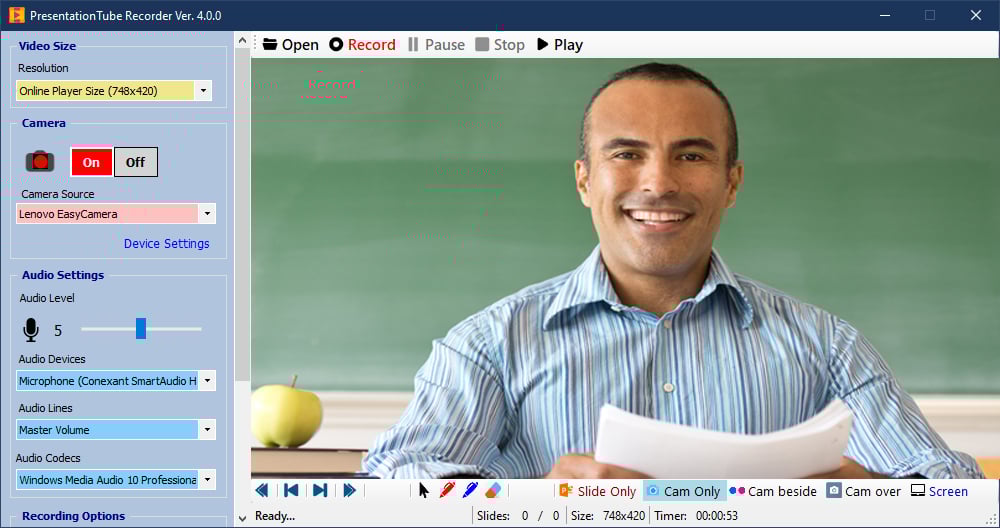
PT Recorder for Windows 10 allows you to record, and annotate PowerPoint presentations, and synchronize a variety of essential visual media, including your camera and computer screen. PT Recorder automates the process of recording and ensures that presenters only need minimal technical knowledge and spend no additional time creating or editing video materials.
With our modern online video hosting and sharing platform, you can upload your recorded video presentations with scrollable slide thumbnails, allowing the audience to move to the respective video content and control both the progress and length of video tutorials. Both PresentationTube Recorder and the online platform is available with free plans and unlimited video storage space and delivery bandwidth

Using PT Recorder you can:- Import your existing PowerPoint slides into the recorder.
- Add slide annotations for easy narration while recording.
- Use unlimited number of USB or integrated webcams.
- Synchronize slides, webcam streaming, and full screen.
- Record in Full HD, 2K & 4K video recording.
- Pause, resume, and stop while recording.
- Select video resolution, bitrate, frame rate, and audio source.
- Save video in ASF/WMV/MP4 standard formats.
- Upload & share your recorded video via PresentationTube platform.Advantages1. Quick and easy
To create an interactive video presentation, you just need to import yout existing PowerPoint slides and turn on your camera.
2. Synchronize visual media
You can record and narrate your slides, with your camera, and full screen activities.
3. Informative
A presentation created with PresentationTube Recorder can include not only slides, but also video and audio narrations.
4. Interactive
PresentationTube pltaform integrates video with scrollable slide thumbnails, allowing the audience to control the video presentation and move to the respective video content and control both the progress and length of video tutorials.
Features1. No need to learn how to design new multimedia content since the recorder imports your existing PowerPoint slides.
2. Open and display real PowerPoint slides within the recorder window.
3. ِAdd slide annotations for easy narration while presenting.
4. Navigate through slides the same as they move in PowerPoint full screen mode, or using the simple control panel (next, previous, first and last slide).
5. Display current slide number and total number of slides in the status bar.
6. Support unlimited number of USB or integrated webcams.
7. Display presenter's video in a full screen mode or inside/beside the slide.
8. Synchronize PowerPoint slides, webcam streaming, and desktop screen activities.
9. Pause, resume or stop recording while recording.
10. Control webcam source and settings.
11. Adjust video size, video bitrate, frame rate, and audio quality automatically.
12. Combine and save the video with slides, allowing the audience to control the sequence and progress of the video.